Skip to content
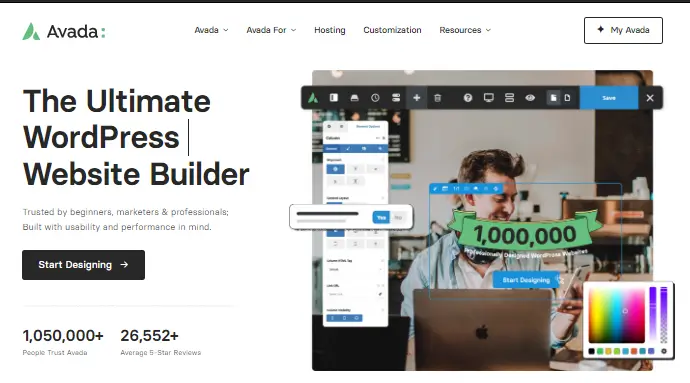
You probably already know Avada is one of the most popular WordPress themes ever sold. What many buyers miss, however, is whether that popularity actually translates into performance, SEO value, and usability for their specific site. In this guide, you’ll learn exactly how Avada performs, where it shines, where it falls short, and whether it’s the right theme for you. Avada is a multipurpose theme used for different websites.
“WordPress Avada theme selection checklist”
Key Takeaways
- Avada is a multipurpose WordPress theme designed for visual site building, customization, and scalable website creation.
- Avada features include a visual builder, prebuilt demos, WooCommerce support, and advanced layout controls.
- Theme performance depends heavily on optimization settings, hosting quality, and how many features are enabled.
- Avada works best for users who prioritize flexibility and design control over minimalist speed-first setups.
- Alternative themes like Astra and GeneratePress may be better for lightweight performance-focused projects.
- Theme selection requires evaluating features, support quality, pricing, and long-term use cases.
- Testing a theme against your project requirements is more valuable than relying on popularity alone.
What Is the Avada WordPress Theme and How Does It Work?
Avada is a multipurpose WordPress theme that combines visual site building, prebuilt layouts, and advanced customization tools in a single framework. That definition explains why it remains one of the best-selling premium themes in the WordPress ecosystem. ThemeFusion developed Avada as an all-in-one design system rather than a minimal starter theme.
First, Avada includes its own proprietary Avada Builder, global theme options, header and footer builder, WooCommerce tools, and responsive controls. For example, current references show 100+ prebuilt websites, 75+ design elements, and 800+ settings — Source: PluginTheme, 2026.
Second, an Avada theme review involves evaluating design flexibility, performance, SEO readiness, support quality, and pricing. That matters because multipurpose themes often trade simplicity for flexibility. Multipurpose WordPress themes often trade simplicity for flexibility, making use-case alignment critical when choosing one.
Avada Builder and Visual Editing
Avada Builder is a drag-and-drop visual builder for page creation. It lets you build layouts without coding.
For example, you can create landing pages, service pages, or portfolio layouts using containers, columns, and elements. This can benefit agencies and freelancers who need reusable design systems.

Prebuilt Demos and Design Templates
Prebuilt demos are ready-made site templates you can import and customize. They reduce setup time significantly.
For example, if you launch a law firm website, restaurant site, or online store, a demo can provide the base framework. This can shorten launch timelines.
“best WordPress themes for beginners” →
Why Is Avada Theme Popular?
Avada matters because theme selection affects speed, SEO, conversions, and long-term scalability. A theme is not just design. It influences performance architecture.
First, site speed affects conversions. A one-second delay can reduce conversions — Source: Portent, 2022. Faster sites also support user engagement.
Second, theme structure affects SEO. Clean markup, responsive layouts, and schema support can strengthen rankings. For more context, see [Internal link: “how WordPress themes affect SEO” → suggested target page/topic].
Third, flexibility affects long-term growth. If you plan to scale from a brochure site to a store, your theme matters.
Theme performance depends on optimization settings, hosting quality, and feature usage more than theme popularity alone. That is one of the most important truths buyers often overlook.
What Features Are Included in the Avada Theme?
Avada features include site-building, design controls, eCommerce support, and SEO-friendly functionality. That broad toolkit is its core value proposition.
Header and Footer Builder
Header and footer builders let you customize navigation, branding, and site structure.
For example, you can create sticky headers, mega menus, and custom mobile menus. This can improve usability.
WooCommerce Compatibility
Avada supports WooCommerce for product catalogs, checkout design, and store layouts.
For example, you can customize product pages visually instead of relying only on default WooCommerce templates. This can benefit conversion-focused stores.
Responsive Design and SEO Features
Responsive design means layouts adapt across devices. Mobile responsiveness matters because mobile traffic often exceeds desktop traffic.
For example, Google prioritizes mobile-first indexing — Source: Google Search Central. Responsive design supports search visibility.
Also, Avada includes:
- Schema-related compatibility
- Fast-loading asset controls
- Lazy loading options
- CSS/JS performance toggles
- Global typography controls
Is Avada Theme Good for SEO and Site Speed?
Avada can be good for SEO and site speed when properly optimized, but it is not a lightweight performance-first theme by default. That distinction matters.
For example, one 2026 benchmark showed 2.3s default load time improved to 1.5s with optimization, while a lightweight theme loaded faster — Source: PluginTheme, 2026.
Avada Speed Test Considerations
Avada speed depends on hosting, caching, and feature usage.
Use this checklist:
- Disable unused features
- Enable performance options
- Use quality caching
- Compress images
- Use managed hosting
“website speed optimization tips” →
“managed WordPress hosting recommendations” →

Code Bloat Concerns
Code bloat refers to loading more assets than a page needs. This is the most common criticism in Avada discussions.
For example, Reddit feedback often praises flexibility but warns about builder lock-in and heavier markup.
That said, Avada is best suited for users who need extensive design control rather than lightweight minimalist performance.
Avada SEO Optimization Review
Avada supports SEO, but results depend on execution. Themes do not replace SEO strategy.
Use this framework:
| SEO Factor | Avada Capability | Depends on User Setup |
|---|---|---|
| Responsive Design | Yes | No |
| Schema Compatibility | Yes | Partial |
| Core Web Vitals | Partial | Yes |
| On-Page SEO | Partial | Yes |
| Internal Linking | Yes | Yes |
Pros and Cons of using the Avada Theme?
Avada pros and cons reflect a trade-off between flexibility and simplicity. That trade-off defines whether it fits your project.
Pros
Avada strengths center on design control and bundled functionality.
Benefits include:
- Massive customization options
- Beginner-friendly visual builder
- Extensive demo library
- WooCommerce support
- Lifetime updates with the purchase model
For example, small agencies often use Avada to reduce plugin dependency.
Cons
Avada limitations center on complexity, performance weight, and ecosystem lock-in.
Common concerns:
- Learning curve
- Heavier than minimalist themes
- Potential shortcode lock-in
- Slower than performance-first alternatives
- Per-site licensing model
For example, community reviews often mention these concerns directly.
Is Avada Theme Worth the Price in 2026?
Avada pricing can be worth it if you need all-in-one functionality, but the value depends on your use case.
Current references show $69 regular license with six months support — Source: ThemeFusion/PluginTheme, 2026.
If you compare the cost against buying:
- Premium theme
- Page builder
- Header builder
- Slider plugin
- Design system tools
…Avada may save money.
But if you only need a fast blog theme, alternatives may offer better value.
Pricing Snapshot
| Factor | Avada | Astra Pro | GeneratePress Premium |
|---|---|---|---|
| Pricing Model | Per site | Annual/Lifetime | Annual/Lifetime |
| Visual Builder | Included | External integrations | Lightweight approach |
| Best For | Flexibility | Speed + flexibility | Performance-first |
How Does Avada Compare to Astra and GeneratePress?
Avada differs from Astra and GeneratePress by prioritizing built-in flexibility over minimalist performance.
Avada vs Astra
Astra is often lighter than Avada.
Choose Avada if you want:
- More built-in tools
- Fewer external plugins
- Heavier visual customization
Choose Astra if you want:
- Faster lightweight framework
- Simpler stack
- Modular setup
Avada vs GeneratePress
GeneratePress prioritizes speed-first architecture.
For example, developers often choose GeneratePress for lean custom builds. Agencies focused on visual production may prefer Avada.
Avada is best for design control. GeneratePress is best for lean performance.
Is Avada Good for WooCommerce Stores?
Avada can be good for WooCommerce stores when design flexibility matters more than extreme performance.
For example, boutique stores with moderate catalogs may benefit from visual product templates.
However, larger stores should test:
- Cart speed
- Product filtering performance
- Checkout performance
- Plugin compatibility

Best Alternatives to Avada Theme?
The best alternatives to Avada depend on whether you prioritize speed, visual design, or modular control.
Consider these:
- Astra — strong flexibility + speed
- GeneratePress — performance-first
- Divi — visual builder competitor
- Blocksy — modern lightweight option
For example, if you want fewer performance concerns, GeneratePress may be better.
How to Test If Avada Fits Your Project
Testing a theme against your project requirements is the best way to choose a WordPress theme.
Use this practical process:
- Import a demo matching your niche
- Test with GTmetrix or PageSpeed
- Review Core Web Vitals
- Build one key conversion page
- Compare against Astra or GeneratePress
Use tools like:
- Google PageSpeed Insights
- GTmetrix
- Pingdom
- WP Rocket
- Cloudflare
What’s Next: Should You Use Avada?
You should use Avada if your priority is design flexibility, client delivery speed, and all-in-one site building.
Use Avada if you are:
- A freelancer building client sites
- A small business wants visual control
- An agency needing reusable templates
- A WooCommerce owner needing layout flexibility
Skip Avada if you are:
- Building ultra-fast minimalist sites
- Focused on Core Web Vitals above all
- Avoiding builder lock-in
By testing Avada against your specific requirements, you can make a smarter decision.
Conclusion
Avada is a powerful multipurpose WordPress theme, but whether it is worth it depends on your goals. If you want extensive design control, bundled tools, and scalable customization, Avada remains a strong option.
If you prioritize lightweight speed, alternatives like Astra or GeneratePress may serve you better.
The smartest decision is not choosing based on hype. It is choosing based on fit.
Use your goals as the benchmark. Test performance. Compare alternatives. Then commit confidently.