

Quick Overview
Summary: Porto is a premium WordPress theme that allows you to launch professional, fully responsive, and SEO-friendly websites quickly. It comes with 200+ ready-made demos, WooCommerce integration, Elementor & WPBakery compatibility, and fast performance, making it perfect for business owners, freelancers, and agencies.
Key Features of Porto Theme

200+ Pre-Built Demos
Extensive library covering every niche from business to e-commerce
200+ Pre-Built Demos
Extensive library covering every niche from business to e-commerce
200+ Pre-Built Demos
Extensive library covering every niche from business to e-commerce
200+ Pre-Built Demos
Extensive library covering every niche from business to e-commerce
Why Choose proto Theme?
Clients often wonder: “Why should I pay for a premium theme when free themes exist?”
Porto stands out because:

- Time-saving: Pre-built demos allow you to launch websites in minutes.
- Flexible customization: Adjust layouts, headers, colors, and typography easily.
- Client-friendly: Even clients with no technical experience can manage pages and content.
Pros & Cons
✅ Huge demo library for all industries
✅ Huge demo library for all industries
✅ Huge demo library for all industries
❌ One site per regular license
❌ No free version
❌ Easy to use interface
Test & Real Experience
We tested Premium Pro extensively across multiple hosting environments and use cases. Here are our real-world performance results:
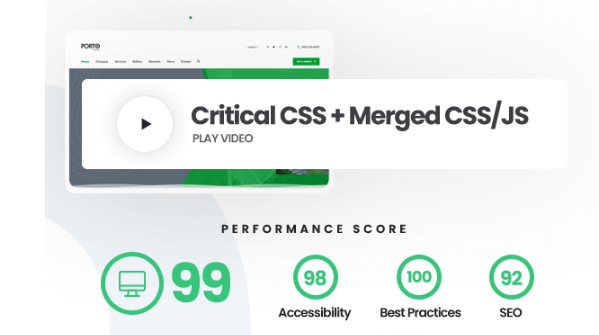
90
Google PageSpeed Score
90
Google PageSpeed Score
90
Google PageSpeed Score
Installation & Setup Process
Installing Porto is simple and beginner-friendly, but here’s a step-by-step guide for clarity:
1. Purchase & Download
After chose the right WordPress theme for your business you need downloade the theme. First go Envato Market at this link then click buy now buttton then complete the payment . then downalode as a zip file . Or you can downlaode from also your Account Dashboard
Step 1: Purchase & Download
- Buy Porto Theme from ThemeForest.
- Download the Theme Package (ZIP file).
Step 2: Install via WordPress Dashboard
- Go to Appearance > Themes > Add New > Upload Theme.
- Upload the ZIP file and click Install Now.
- Activate the theme.
Step 3: Install Required Plugins
- After activation, Porto will suggest required plugins, including Elementor/WPB, WooCommerce, and other functionality plugins.
- Install & activate them via the Plugin Installer.
Step 4: Import Demo Content
- Go to Porto > Demos in the WordPress dashboard.
- Choose a demo suitable for your website type.
- Click Import — content, images, menus, and layouts will be added automatically.
Step 5: Customize Your Site
- Use Theme Options Panel for colors, typography, headers, and footers.
- Edit pages using Elementor or WPBakery for custom layouts
Pricing & Plans
hello world
Additional Client-Focused Points
1. Easy Maintenance & Updates
Porto updates regularly. Clients don’t have to worry about security issues or outdated features.
2. Support & Documentation
- Excellent ThemeForest support.
- Step-by-step documentation for beginners.
- Video tutorials available for setup and customization.
3. Accessibility & Usability
- ARIA roles and semantic HTML make websites accessible.
- Clients’ websites can cater to users with disabilities.
4. Design Flexibility
- Multiple pre-designed headers, footers, and page layouts.
- Color and typography options to match branding.
- Perfect for agencies designing multiple client websites.
5. Integration with Popular Plugins
- Compatible with Yoast SEO, RankMath, Elementor, WPBakery, WooCommerce, Contact Form 7, and others.
- Reduces plugin conflicts for clients.